
Let’s discuss some stuff about creating a custom user model in Django.
The traditional user model in django allows you to login to a website by using
username & password.
Although we are more feasible to login by using email address / mobile rather than an username.
For that we have to create our custom(desired) user model for authentication purpose.
In this project we are creating a model to login by using user’s mobile number.
Let’s write some code to achieve our objective 😊 .
Create an app in your project Ex : (my_app)
In models.py of your app write the following code below.
Import some authentication packages in django
They are AbstractBaseUser & BaseUser Manager
from django.db import models
from django.contrib.auth.models import AbstractBaseUser,BaseUserManager
Create a class (User) for storing various fields like mobile,username,email etc., and the required fields are mandatory.
USERNAME_FIELD decides which field you want to use for login
# Class for creating our desired  fields
class User(AbstractBaseUser):
    mobile          = models.CharField(max_length=40,unique=True)
    email           = models.EmailField(verbose_name="email",max_length=60,unique=True)
    username        = models.CharField(max_length=30,unique=True)
    date_joined     = models.DateTimeField(verbose_name="date joined",auto_now_add=True)
    last_login      = models.DateTimeField(verbose_name="last login",auto_now_add=True)
    is_admin        = models.BooleanField(default=False)
    is_active       = models.BooleanField(default=True)
    is_staff        = models.BooleanField(default=False)
    is_superuser    = models.BooleanField(default=False)

    # This  USERNAME_FIELD  is the main part in this code which is used for login purpose
    USERNAME_FIELD  = 'mobile'

    # The username and password are the inbuilt fields you can also edit according to your requirements
    REQUIRED_FIELDS = ['username','email',]

    # Used to locate the above class(User manager)  for managing users
    objects = UserManager()

    # function returns the string
    def __str__(self):
        return self.email

    # decides the permission of the user
    def has_perm(self,perm,obj=None):
        return self.is_admin

    def has_module_perms(self,app_label):
        return True
Then create a UserManager class which holds two different functions for creating a normal user and a super user.
** This UserManager class is above the User class
# class to differenciate normal user and a superuser
class UserManager(BaseUserManager):
    # To create a normal user
    def create_user(self,email,mobile,username,password=None):
        if not email:
            raise ValueError("Users must have an email address")
        if not username:
            raise ValueError("Users must have an username")

        user    =   self.model(
            mobile=mobile,
            email = self.normalize_email(email),
            username = username,
            )
        user.set_password(password)
        user.save(using=self._db)
        return user

    # To create a super user,who has all permissions to  access the admin page
    def create_superuser(self,email,mobile,username,password):
        user = self.create_user(
            mobile=mobile,
            email=self.normalize_email(email),
            password = password,
            username=username,

            )
        user.is_admin = True
        user.is_staff = True
        user.is_superuser = True
        user.save(using=self._db)
        return user
The entire code for the custom user model is…
from django.db import models
from django.contrib.auth.models import AbstractBaseUser,BaseUserManager


# class to differenciate normal user and a superuser
class UserManager(BaseUserManager):
    # To create a normal user
    def create_user(self,email,mobile,username,password=None):
        if not email:
            raise ValueError("Users must have an email address")
        if not username:
            raise ValueError("Users must have an username")

        user    =   self.model(
            mobile=mobile,
            email = self.normalize_email(email),
            username = username,
            )
        user.set_password(password)
        user.save(using=self._db)
        return user

    # To create a super user,who has all permissions to  access the admin page
    def create_superuser(self,email,mobile,username,password):
        user = self.create_user(
            mobile=mobile,
            email=self.normalize_email(email),
            password = password,
            username=username,

            )
        user.is_admin = True
        user.is_staff = True
        user.is_superuser = True
        user.save(using=self._db)
        return user


# Class for creating our desired  fields
class User(AbstractBaseUser):
    mobile          = models.CharField(max_length=40,unique=True)
    email           = models.EmailField(verbose_name="email",max_length=60,unique=True)
    username        = models.CharField(max_length=30,unique=True)
    date_joined     = models.DateTimeField(verbose_name="date joined",auto_now_add=True)
    last_login      = models.DateTimeField(verbose_name="last login",auto_now_add=True)
    is_admin        = models.BooleanField(default=False)
    is_active       = models.BooleanField(default=True)
    is_staff        = models.BooleanField(default=False)
    is_superuser    = models.BooleanField(default=False)

    # This  USERNAME_FIELD  is the main part in this code which is used for login purpose
    USERNAME_FIELD  = 'mobile'

    # The username and password are the inbuilt fields you can also edit according to your requirements
    REQUIRED_FIELDS = ['username','email',]

    # Used to locate the above class(User manager)  for managing users
    objects = UserManager()

    # function returns the string
    def __str__(self):
        return self.email

    # decides the permission of the user
    def has_perm(self,perm,obj=None):
        return self.is_admin

    def has_module_perms(self,app_label):
        return True
After creating model we have to replace the existing user model with our new model
In settings.py of your main project add these few lines
AUTH_USER_MODEL = ‘(your app name.modelname)’
AUTH_USER_MODEL = 'my_app.User'
Don’t forgot to add your app to the installed apps in settings.py 😊.
Make migrations by using #python manage.py makemigrations
Migrate all the data-models by using #python manage.py migrate
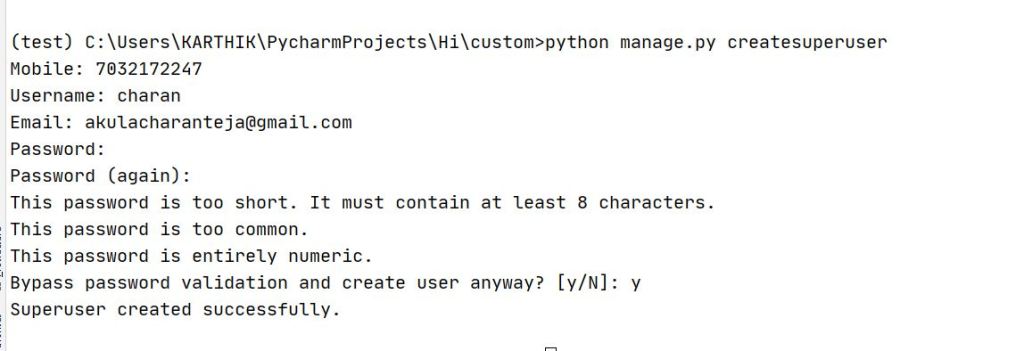
Now create a superuser by using #python manage.py createsuperuser
Follow the couple of steps and they look like
Run the server by using #python manage.py runserver
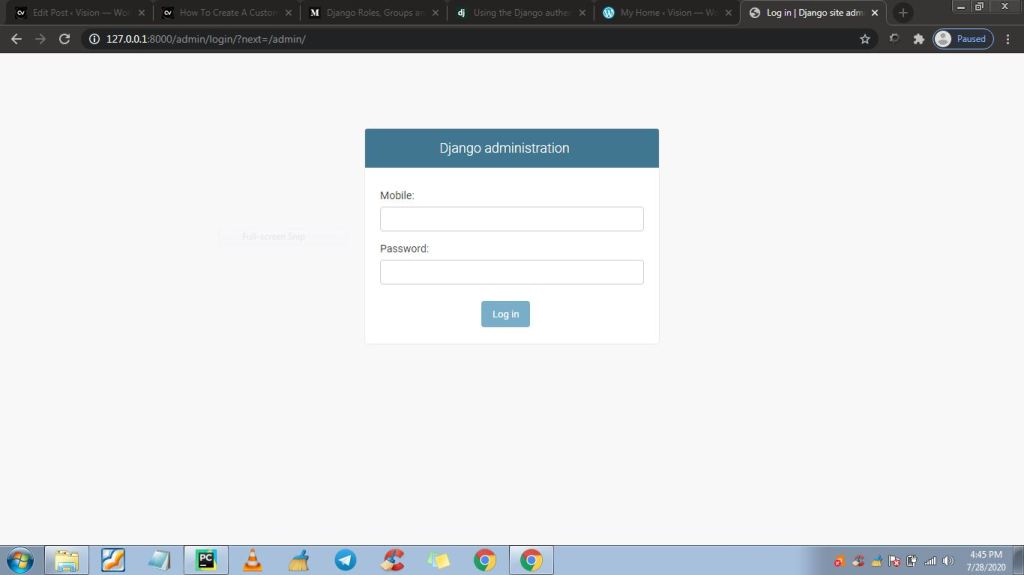
In your serchbar search # http://127.0.0.1:8000/admin
And now you can login into admin pannel by using mobile number & password.
Your custom user model is ready.
Thank you…

